This follows on from: Generative AI for Genealogy – Part I
The UI Flow and the Art of Switching GEDCOM Files with an LLM
Before I could build anything remotely intelligent, I had to make the first and most sacred of all software‑engineering decisions: which UI technology do I want to regret later?
On paper, the obvious choice was .NET MAUI. It’s cross‑platform, it reaches mobile, and it would let me run my genealogy assistant on iOS, which feels like the sort of thing a modern human should be able to do. But then reality tapped me on the shoulder and whispered:
“Remember the last time you tried to move a panel in MAUI?”
And suddenly I was back in that moment – dragging a control one pixel to the left, watching the entire layout shift like tectonic plates, and muttering to myself about how Microsoft, a company capable of landing rockets on Azure, somehow didn’t ship a proper WYSIWYG designer.
Yes, you can edit and reload. No, that is not the same as productivity. Yes, I still scream inside.
So for the proof‑of‑concept, I went with the old faithful: Windows Forms. It’s not glamorous, but it’s fast, predictable, and doesn’t require me to spiritually align my chakras before placing a button.
The Desired Flow
The UI flow is beautifully simple, the kind of simple that only emerges after several hours of overthinking it.
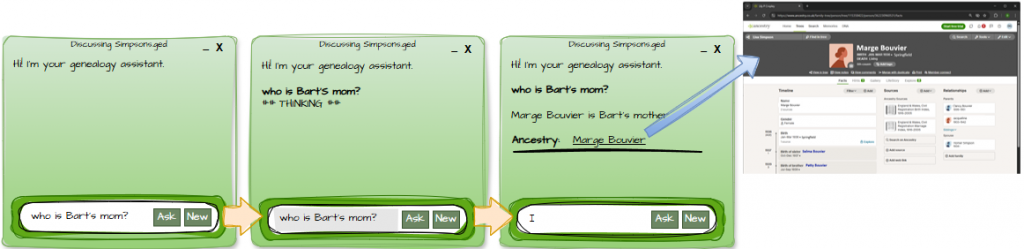
It goes like this:
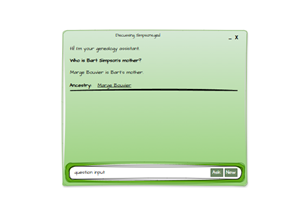
- The app greets the user like a polite Victorian butler.
- The user types a question.
- They click Ask, and the UI springs into action:
- It repeats the question back in bold, just to prove it was listening.
- It displays a dramatic ## THINKING ## banner.
- It calls the LLM module on a background thread, because freezing the UI is so 2005.
When the LLM finally returns from its intellectual pilgrimage:
- The answer appears.
- If the answer mentions people, the UI generates a tidy list of hyperlinks to their profiles on Ancestry.com..
- A divider is inserted to keep everything neat, like a librarian who’s had too much coffee.
The Ask/Cancel Button Dance
Users are impatient. LLMs are thoughtful. This is not always a harmonious pairing.
So while the model is thinking, the Ask button transforms into a Stop button: a bright red square that screams “I’m doing something complicated; press me if you dare.”
It’s a small touch, but it makes the whole experience feel alive, responsive, and slightly dramatic.

Starting Fresh: The New Conversation Button
Just like ChatGPT, Copilot, or any other LLM interface, sometimes you want to abandon your current train of thought and start a new one before it derails into nonsense.
So the UI includes a New button – a clean slate, a fresh start, a digital deep breath.
![Diagram showing question box with [Ask] and [New] buttons.](https://aimlfun.com/wp-content/uploads/2026/01/image-43.png)
It’s obvious when you see it, but still worth documenting. Requirements have a habit of becoming “obvious” only after you’ve built them.
The Faux Caption Bar
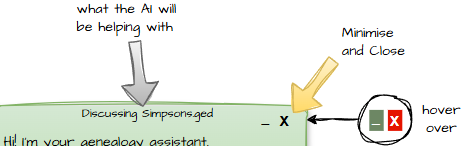
Because this is a fat‑client app, I wanted the user to always know which GEDCOM file they’re currently discussing. So I built a simulated caption bar complete with minimise and close buttons that light up on hover like a tiny Windows cosplay.
It’s a small detail, but it anchors the whole experience. When you’re juggling multiple family trees, knowing which one you’re interrogating is surprisingly important. Nobody wants to ask about Great‑Grandad Alfred and accidentally get the life story of Cousin Barry instead.