API Keys & Switching
GPT
To demonstrate how to call GPT from C#, I asked Bing/GPT for an example. The code below is not mine, so if it accidentally wipes out your local village, I deny all responsibility.
using System;
using System.Threading.Tasks;
using OpenAI; // From the OpenAI NuGet package

class Program
{
    static async Task Main(string[] args)
    {
        // Load API key from environment variable for security
        string apiKey = Environment.GetEnvironmentVariable("OPENAI_API_KEY");

        if (string.IsNullOrWhiteSpace(apiKey))
        {
            Console.WriteLine("Error: OPENAI_API_KEY environment variable not set.");
            return;
        }

        try
        {
            // Create OpenAI client
            var api = new OpenAIClient(apiKey);

            // Send a prompt to GPT
            var chatRequest = new ChatRequest(
                model: "gpt-4", // or "gpt-3.5-turbo"
                messages: new[]
                {
                    new ChatMessage(ChatRole.System, "You are a helpful assistant."),
                    new ChatMessage(ChatRole.User, "Write a short C# method that reverses a string.")
                }
            );

            var chatResponse = await api.ChatEndpoint.GetCompletionAsync(chatRequest);

            // Output the response
            Console.WriteLine("GPT Response:");
            Console.WriteLine(chatResponse.FirstChoice.Message.Content);
        }
        catch (Exception ex)
        {
            Console.WriteLine($"Error calling GPT API: {ex.Message}");
        }
    }
}
Or, if you prefer the raw REST API:
using System;
using System.Net.Http;
using System.Net.Http.Headers;
using System.Text;
using System.Text.Json;
using System.Threading.Tasks;

class Program
{
    static async Task Main()
    {
        string apiKey = Environment.GetEnvironmentVariable("OPENAI_API_KEY");
        if (string.IsNullOrWhiteSpace(apiKey))
        {
            Console.WriteLine("API key not set.");
            return;
        }

        using var client = new HttpClient();
        client.DefaultRequestHeaders.Authorization = new AuthenticationHeaderValue("Bearer", apiKey);

        var requestBody = new
        {
            model = "gpt-4",
            messages = new[]
            {
                new { role = "system", content = "You are a helpful assistant." },
                new { role = "user", content = "Explain async/await in C# briefly." }
            }
        };

        var json = JsonSerializer.Serialize(requestBody);
        var content = new StringContent(json, Encoding.UTF8, "application/json");

        try
        {
            var response = await client.PostAsync("https://api.openai.com/v1/chat/completions", content);
            response.EnsureSuccessStatusCode();

            var responseString = await response.Content.ReadAsStringAsync();
            Console.WriteLine(responseString);
        }
        catch (Exception ex)
        {
            Console.WriteLine($"Error: {ex.Message}");
        }
    }
}
It really is that easy. Your cat could be calling GPT while you sleep. (If it starts ordering treats, don’t blame me.)
Why two ways? Because OpenAI provides both a high‑level wrapper and the bare‑metal API. Choice is good.
But here’s the important bit: Never expose your API keys. Unless your bank balance resembles Musk, Bezos, or Gates, in which case… adopt me?
With a fat‑client app, any half‑motivated script kiddie can extract your tokens. Decompiling C# is shockingly easy. If you’ve read my “About Me”, you’ll know that teenage‑me once hex‑dumped an entire operating system onto a dot‑matrix printer (about four inches thick), re‑keyed it at home, and then disassembled the OS security. Compared to that, C# is a warm‑up exercise.
So no — I’m not embedding API keys in a desktop app.
The correct approach is to have the client call my secure REST API, which then acts as a proxy to GPT, Claude, Gemini, and whatever else the future throws at us.
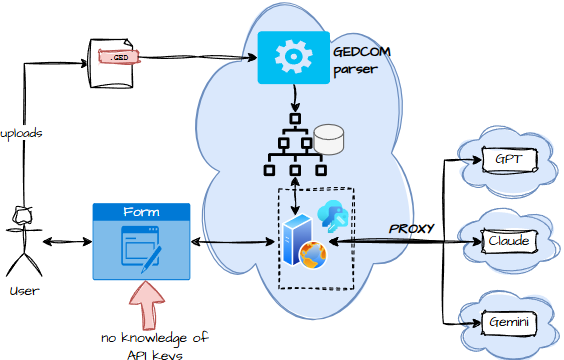
Or, if you prefer a flow‑based view:

The client never sees the cloud API keys. It can’t call the LLM directly. Everything goes through the licence server, which can filter, throttle, or reject requests. Yes, it adds a tiny bit of latency — but the alternative is letting your cloud bill grow legs and run off into the sunset.
Claude
Same disclaimer as before: Bing/GPT suggested this code too.
using System;
using System.Net.Http;
using System.Net.Http.Headers;
using System.Text;
using System.Threading.Tasks;
using Newtonsoft.Json;
using Newtonsoft.Json.Linq;

class Program
{
    // Replace with your Anthropic API key
    private const string ApiKey = "YOUR_ANTHROPIC_API_KEY";
    private const string ApiUrl = "https://api.anthropic.com/v1/messages";

    static async Task Main()
    {
        try
        {
            string prompt = "Write a short haiku about winter.";

            string response = await CallClaudeAsync(prompt);

            Console.WriteLine("Claude's Response:");
            Console.WriteLine(response);
        }
        catch (Exception ex)
        {
            Console.WriteLine($"Error: {ex.Message}");
        }
    }

    /// <summary>
    /// Sends a prompt to Claude and returns the text response.
    /// </summary>
    static async Task<string> CallClaudeAsync(string prompt)
    {
        using (var client = new HttpClient())
        {
            // Set required headers
            client.DefaultRequestHeaders.Authorization = new AuthenticationHeaderValue("Bearer", ApiKey);
            client.DefaultRequestHeaders.Add("anthropic-version", "2023-06-01");

            // Prepare request body
            var requestBody = new
            {
                model = "claude-3-opus-20240229", // Choose the Claude model
                max_tokens = 200,
                messages = new object[]
                {
                    new { role = "user", content = prompt }
                }
            };

            string json = JsonConvert.SerializeObject(requestBody);

            var content = new StringContent(json, Encoding.UTF8, "application/json");

            // Send POST request
            HttpResponseMessage response = await client.PostAsync(ApiUrl, content);
            response.EnsureSuccessStatusCode();

            string resultJson = await response.Content.ReadAsStringAsync();

            // Parse JSON to extract Claude's reply
            JObject parsed = JObject.Parse(resultJson);
            var text = parsed["content"]?[0]?["text"]?.ToString();

            return text ?? "(No response text)";
        }
    }
}
Gemini
using System;
using System.Threading.Tasks;
using Google.AI;
using Google.AI.GenAI; // Namespace for Generative AI

class Program
{
    static async Task Main(string[] args)
    {
        try
        {
            // Retrieve API key from environment variable
            string apiKey = Environment.GetEnvironmentVariable("GOOGLE_API_KEY");
            if (string.IsNullOrWhiteSpace(apiKey))
            {
                Console.WriteLine("Error: GOOGLE_API_KEY environment variable not set.");
                return;
            }

            // Create a Gemini client
            var client = new GenerativeModel(
                model: "gemini-pro", // Text model
                apiKey: apiKey
            );

            Console.Write("Enter your prompt: ");
            string prompt = Console.ReadLine();

            if (string.IsNullOrWhiteSpace(prompt))
            {
                Console.WriteLine("Prompt cannot be empty.");
                return;
            }

            // Send request to Gemini
            var response = await client.GenerateContentAsync(prompt);

            // Display the result
            if (response != null && response.Candidates.Count > 0)
            {
                Console.WriteLine("\nGemini Response:");
                Console.WriteLine(response.Candidates[0].Content);
            }
            else
            {
                Console.WriteLine("No response from Gemini.");
            }
        }
        catch (Exception ex)
        {
            Console.WriteLine($"Error: {ex.Message}");
        }
    }
}
And yes, I’ve ignored Grok. It’s getting the silent treatment. You’re welcome to explore it if you enjoy chaos.
Now, you might be thinking: “This is just a blog post full of internet scraps.” But no — there’s a point.
All three LLMs share the same conceptual shape: You send something → they send something back → all guarded by an API key.
But the details? Completely different. Different wrappers. Different endpoints. Different conventions. It’s as if the entire industry collectively decided that standards are for other people.
So we need an adaptor — a layer that hides the quirks of each LLM and exposes a clean, consistent interface to our genealogy engine.