Executing Code (Because It’s Nicer Than Executing Humans)
LLMs like Reasoner v1 can write C# code to solve complex problems. I covered this in my “LLMings” post. I’m not diving into code execution here, because this chapter is about tool use, but my system supports both. The reason will become clear soon.
Skills-Tools Structure
How do we structure prompts, skills, and tools?
Right now, my setup is… functional. Not elegant.
- Prompts live in Markdown files with an include syntax
- Skills are Markdown files in an
\llm\folder - I have a AIToolFunctions.cs file with a giant switch statement
- That class interfaces with the GEDCOM object
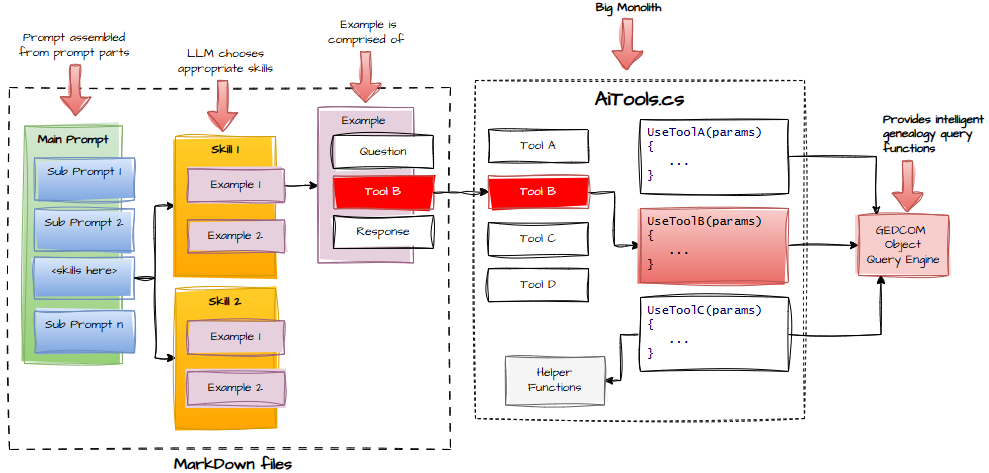
Why? Because I haven’t refactored it yet.
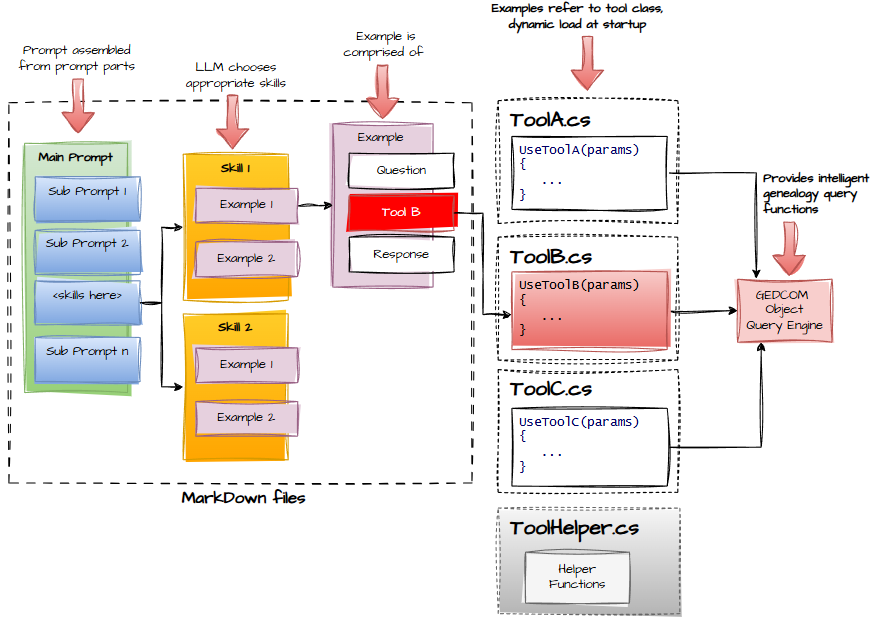
As the system grows, I need to:
- Break up the giant tool‑functions class
- Decouple skills from code
- Allow skills to register themselves
- Align C# callable functions with non‑code tools
The pace has ramped up intentionally. I don’t want readers thinking this is all superficial. We’re now deep in the machinery, and there’s still plenty more to cover.
If I’m going too fast, leave a comment. I’ll pretend I didn’t see it and continue at the same speed, but it’ll make me feel loved.
Observability
(a.k.a. “How to see what your AI is really doing, instead of what you hope it’s doing.”)