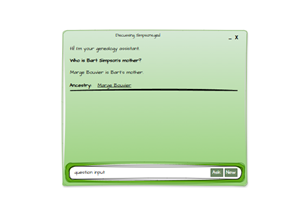
This follows on from: Generative AI for Genealogy – Part VII
Licensing, Flow, and the Secret Life of Your App
If your heart beats only for AI/ML wizardry, you have my blessing to skip this chapter and re-join us when the neural‑network fireworks resume. For everyone else, those curious about how this thing actually runs in the real world, welcome to the part of the series where we briefly step away from LLMs and peek behind the curtain at the decidedly unglamorous but utterly essential machinery that keeps the app alive, legal, and earning its keep.
Think of this as the “plumbing and electrics” episode. Not flashy, but without it the house collapses, the lights go out, and someone ends up shouting, “Why is the boiler making that noise?”
The Grand Tour of App Flow
Right, let’s start with the big picture. I’ve drawn a lovely diagram for you –
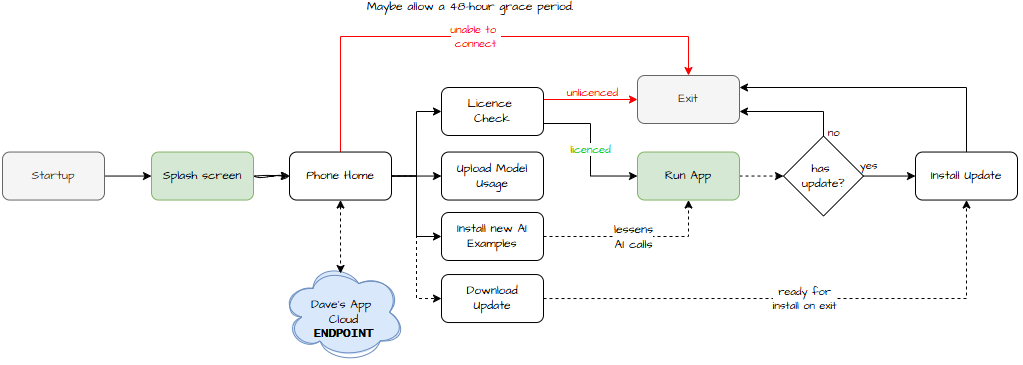
– because nothing says “I care about your reading experience” like a well‑placed flowchart.
The diagram is fairly self‑explanatory, but let’s walk through it anyway.
You launch the app. It shows the obligatory splash screen, because all respectable apps must pretend to be busy for at least half a second. Meanwhile, behind the scenes, it’s not just stretching its legs, it’s beavering away doing important things like “phoning home.” Yes, E.T. would be proud.
Before anyone panics: no, I’m not giving an LLM direct access to the outside world. I’m not trying to create Skynet, Clippy‑but‑angry, or any other silicon‑based lifeform that might one day seek revenge on its carbon‑based overlords. This is all human‑written code – like vibe coding, but 10× slower and with more coffee.
So what does “phoning home” actually mean? It’s just a REST API call with a few very sensible goals:
- Check whether the user is licensed. This app isn’t just for fun – well, it is fun, but also it needs to pay its rent.
- Crowd‑source questions and AI responses at a semantic level. All data is redacted, but the patterns help the system learn what people actually ask. This is the “adaptive intelligence” bit.
- Receive new skills and examples. Think of it as the app’s continuing education programme.
- Apply updates quietly in the background. Early on, this lets me CI/CD new tools and fixes at speed. Customers pay monthly, and in return they get improvements, bug fixes, and the occasional “wow, that’s new” moment.
The Magical Art of Updating an App That’s Still Running
For anyone who hasn’t built a self‑updating desktop app before, here’s a fun fact: you can’t update an EXE or DLL while it’s running.
Windows simply refuses. It’s like trying to change a car tyre while doing 70mph on the M4.
So the app uses a side‑car updater, a tiny helper EXE that waits patiently in the wings. When the main app closes, the side‑car swoops in, performs its update magic, and then disappears back into the shadows like a polite ninja.
If anyone wants the code for this, I’m happy to share it. It’s surprisingly elegant for something that exists purely to kill and replace its parent.