How the System Actually Works
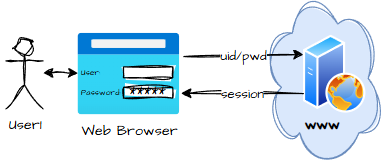
Our process starts with a login:
As each user uploads their GEDCOM, the data is parsed and stored in their session:
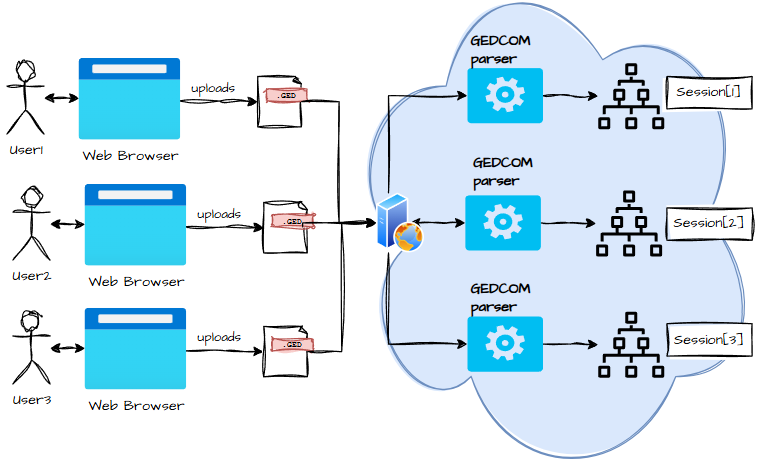
If user #2 starts chatting, the system pulls their data from their session:
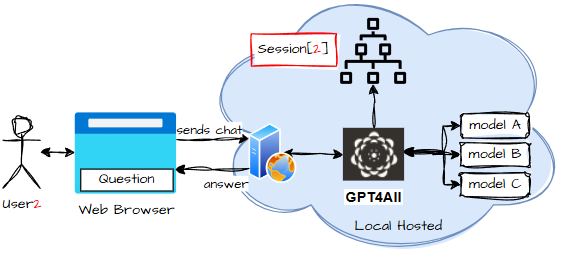
Now, before anyone with a security background starts giggling into their hoodie, let’s calm those nerves. Yes, the diagrams look vague. Yes, it resembles the kind of architecture you might sketch on a napkin at a pub. But I am an architect — you’d hope I have some idea of what I’m doing.
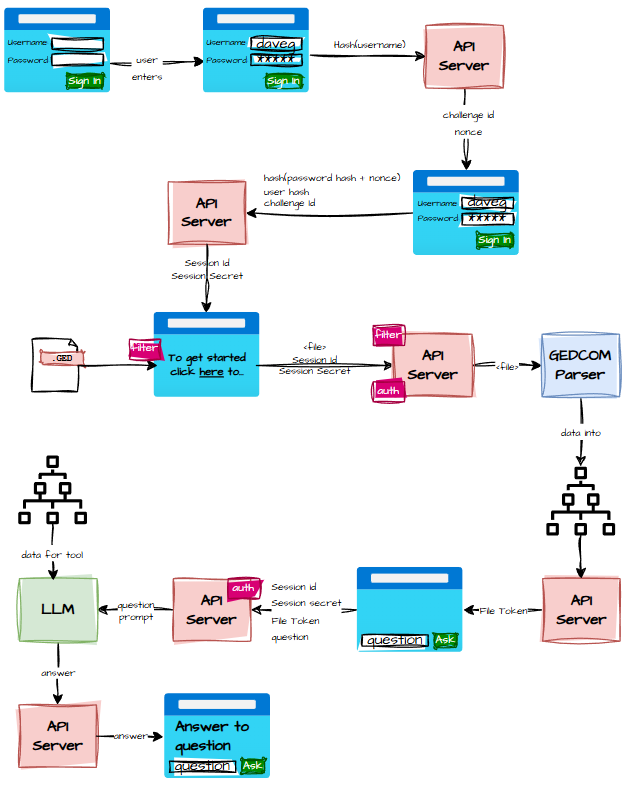
So let’s break it down properly, UML‑style:
Sign‑In: The Cryptographic Handshake
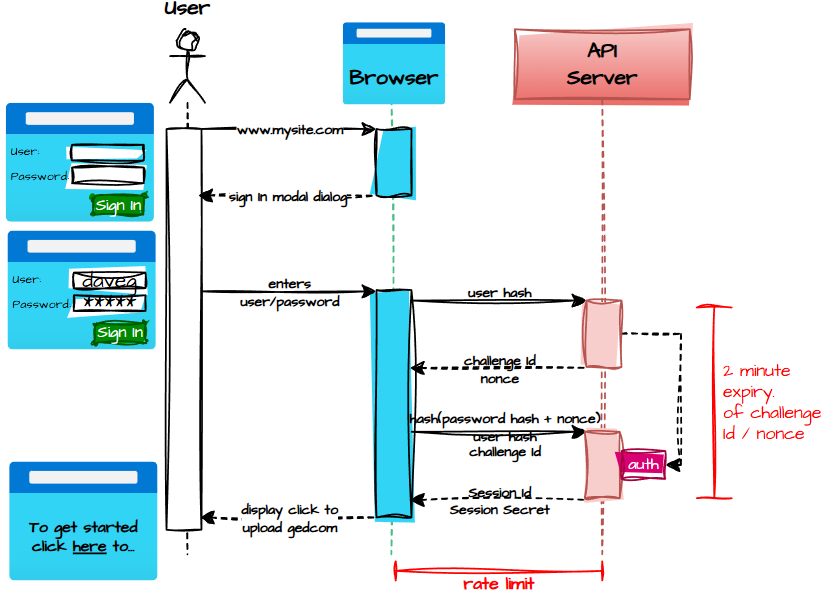
Security is one of those topics where you either feel quietly smug or quietly terrified, depending on how recently you last checked your logs.
For this project, I wanted something lightweight, anonymous, and robust enough that I wouldn’t wake up one morning to discover someone had used my system to run 40,000 free LLM queries about their cat.
So the sign‑in flow became a kind of cryptographic handshake ritual — part nightclub bouncer, part secret society.
It goes like this:
- The user arrives at the webapp, bright‑eyed and ready to explore their ancestors.
- A modal dialog pops up, politely demanding a username and password like a Victorian butler asking for your calling card.
- The user enters their details and clicks Sign In.
- The browser sends a hash of the username to a “challenge” API — because anonymity is the name of the game.
- The server responds with:
- a challenge ID (a fresh
Guid(), because nothing says “I’m serious about security” like a GUID), - and a nonce (32 random hex digits, the cryptographic equivalent of a handshake that changes every time).
- a challenge ID (a fresh
- The browser uses that nonce to create an authentication token. This ensures that even if someone intercepted the password hash, it would be useless — the token is only valid for a short window. It sends back:
- the challenge ID,
- the user hash,
- and the authentication token.
- The API server checks whether the user hash belongs to a known customer.
- It then re‑hashes the stored password hash with the nonce and compares it to the authentication token. If they match, the stars align.
- Success means the server returns a Session ID and Session Secret — both GUIDs, both unique, both required for every future request.
- The browser then moves the user to the GEDCOM upload page, ready for genealogical adventure.
Uploading GEDCOMs: The Sacred Scrolls
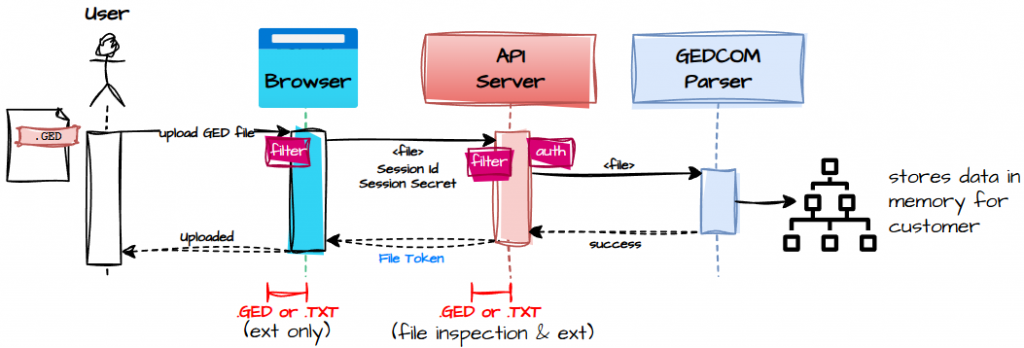
Once authenticated, the user can upload their GEDCOM using this flow:
- The user selects their GED file.
- The browser immediately filters out anything that isn’t
.gedor.txt, because nobody wants someone uploading a.zipfull of malware or a holiday photo of their dog. - A spinner appears, because spinners are the universal symbol for “please hold while magic happens.”
- The browser sends the file to the API server, including the Session ID and Session Secret in the headers.
- The server validates the session — no valid session, no entry.
- The server reads the file, checks the extension and contents, and then hands it off to the GEDCOM parser.
- The parsed tree is stored in memory (not on disk — we’re keeping things ephemeral and privacy‑friendly).
- The server returns a File Token, which represents the parsed tree and is required for all future chat queries.
- The spinner disappears, and the user is told the upload succeeded.
At this point, the system knows who the user is (anonymously), what their session is, and which family tree belongs to them. The stage is set.
Chat: Where the Magic Happens
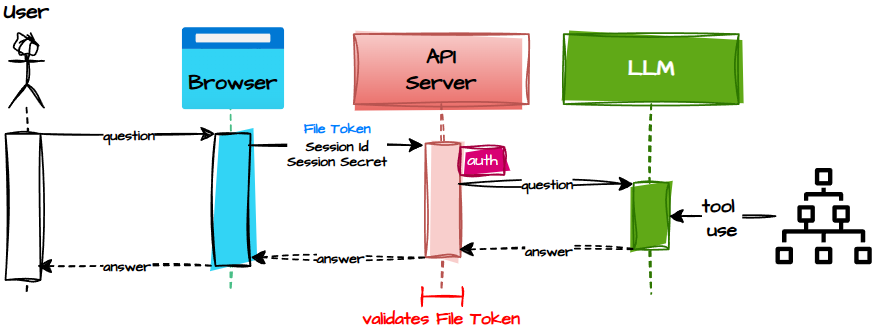
The chat feature is where everything comes together — the user, the LLM, and the centuries of family drama encoded in their GEDCOM.
But chatting is only allowed once the GEDCOM has been uploaded and parsed. No tree, no chat. The File Token is the golden ticket.
Here’s the flow:
- The user types a question.
- The browser sends:
- Session ID
- Session Secret
- File Token to the API server.
- The server validates the session and the File Token.
- If everything checks out, the server forwards the question to the LLM along with the parsed GEDCOM data.
- The LLM analyses the family tree, interprets the question, and produces an answer.
- The answer flows back to the browser and appears in the chat window.
Or, if you prefer your architecture with a bit more serpentine flair…
By the time I finished sketching all this out, it was well past midnight. On paper it looks good — or at least I assume it does. I don’t print things. Printing is for people who have toner and emotional stability.