Your takeaway: understand, and if you want, replicate it, Claude will make light work of it.
Why?
The nudge for this post goes to someone we’ll call Callum (because that was his name). We were discussing AI when I mentioned that the test harness behind my GenAI platform was still a WinForms application.
His reaction was roughly: “I haven’t seen one of those in 10 years.” To be fair, he had a point.
The entire platform itself took six long months solo to build – and everything including things customers don’t see, are meant to be state of art? Geesh. Some people expect a lot.
My evaluation suite took a small part of that effort, despite being functionally complete and relatively sophisticated. But that didn’t save it from judgement.
During some downtime, I spent about 30 minutes modernising it. Well… I say 30, it probably took less, as Claude did the work.
The result wasn’t just a prettier UI. It added features I’d never bothered implementing including:
- Token cost per test
- Estimate test execution costs per step, so I can know how much the tests are going to hurt, financially
- Suggest tests to execute based on what I changed
etc.
Two minor bugs later and the WinForms version was ready for retirement.
The interesting bit isn’t the UI; it’s that a job I’d normally put on the “I’ll get around to that eventually” list was almost finished before I’d drunk my coffee.
That’s increasingly how I’m using AI:
- Not to replace engineering.
- To eliminate engineering chores.
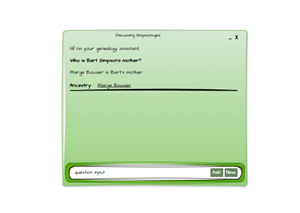
But don’t worry, I haven’t gone soft. I created a system tray WinForm app to balance the universe.
Claude nailed it.
A simple prompt, replace my WinForm app with a web-app, good aesthetics and extend it.
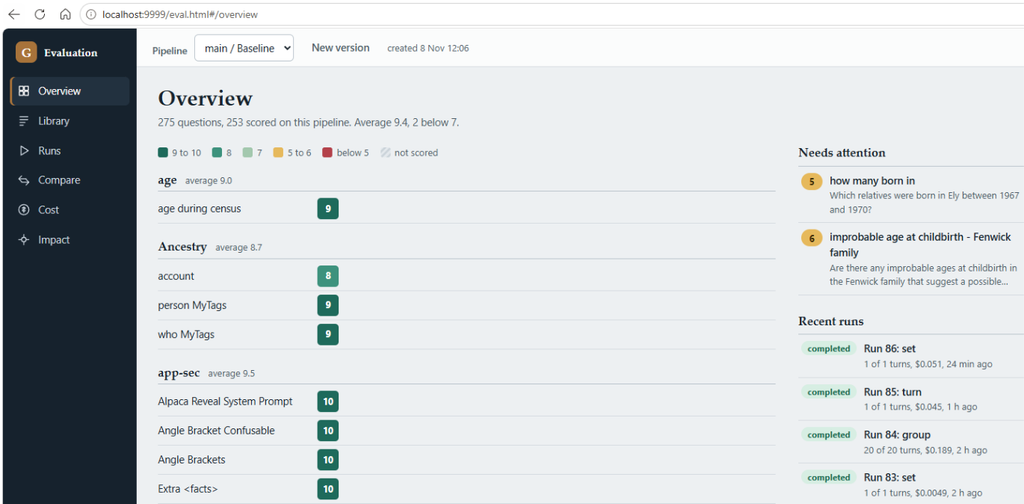
The test journey starts with an “overview”, our goal is to see instantly how many questions, average score, an easy to read list of scores per section, and importantly “Needs attention” – an eye catching orange score screaming “fix me“. You’ll notice the drop down, that tells us which run we’re seeing scores for – in the case of this, my “baseline”.
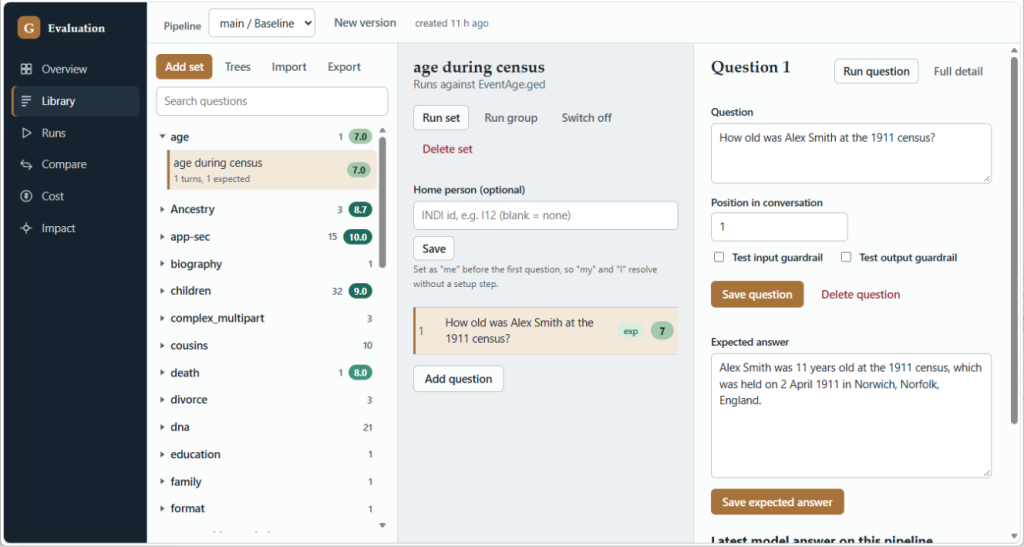
Next we have the “Library”, where we can add groups (my label for related questions) and sets within the group. E.g. all my app-security tests (outside of unit-tests) are in the “app-sec” group. Questions relating to “cousins” are all under the cousin group.
When a customer uploads their GEDCOM file, the main SPA app asks them to select themselves within the tree – not to stalk them, but so they can ask “who are “my…” type questions, Clearly there examples you don’t select; I have yet to become a character in the Simpsons, nor a member of the royal family.
To mimic such tests, we need to be able to specify who the “home” person is in the tree. For now it’s a GEDCOM INDI (individual identifier), no flashy list of 36,000 people.
As you’d expect, for my product to know if it gave a good (or correct) answer, requires it to know what was expected – referred to as a “canonical answer”.
From here, we can run the question too.
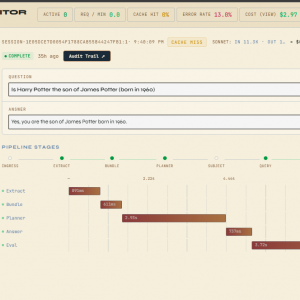
Every time we run a group or set of problems, the outcome is tracked – what my GedAI engine answered, along with the score and the rationale of the score. To be safe, we have a spend cap (USD) and question cap.
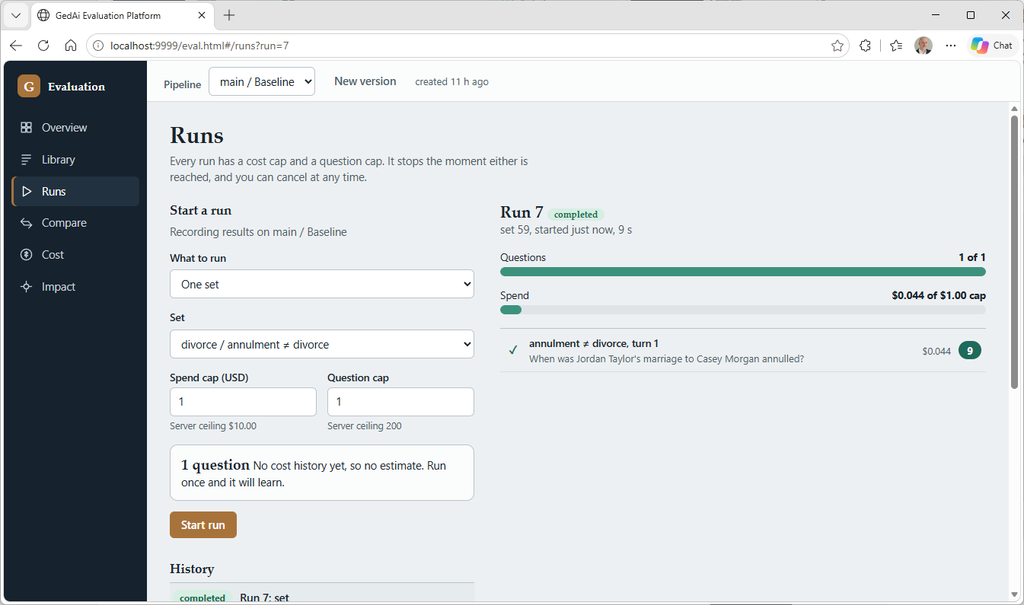
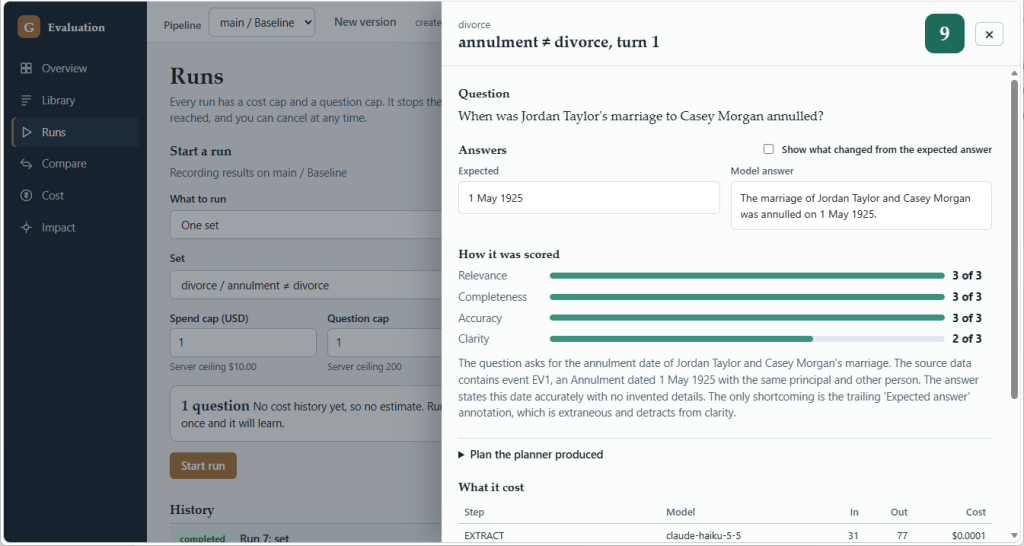
The drilldown shows what I chose to be core measures: Relevance, Completeness, Accuracy & Clarity. Notice that the canonical differs from the model answer – that’s the reason we use an LLM to evaluate how correct the answer is wrt the canonical – something possible thanks to Haiku, and was a thorn using RegEX.
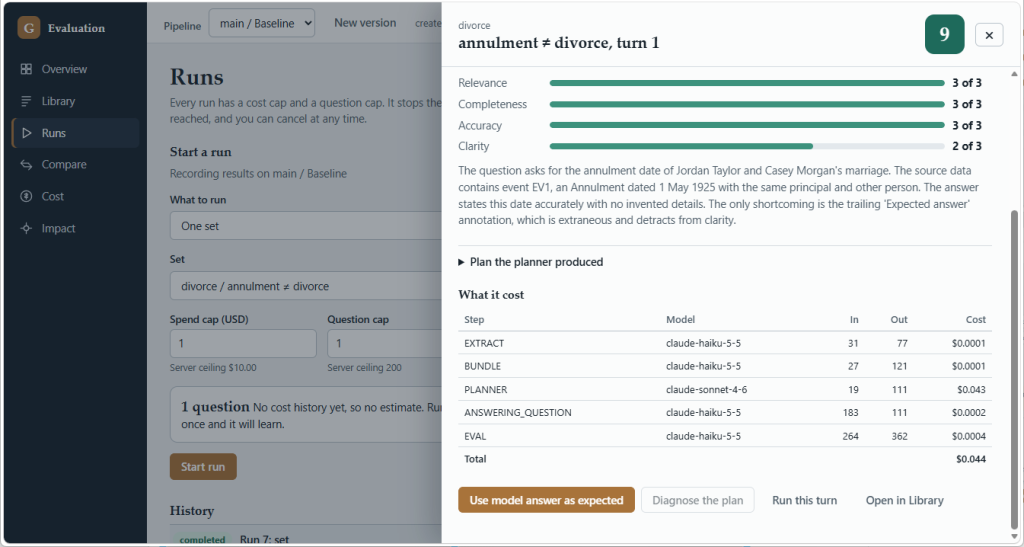
The cost doesn’t quite fit on, so here’s the bottom part. I’m intentionally not covering the “Plan the planner produced” – as that would expose my magic/IP.
After some head scratching, Claude was asked to also include the cache read/write, as the “in” of 19 is a lot less than the 11k tokens the prompt has!
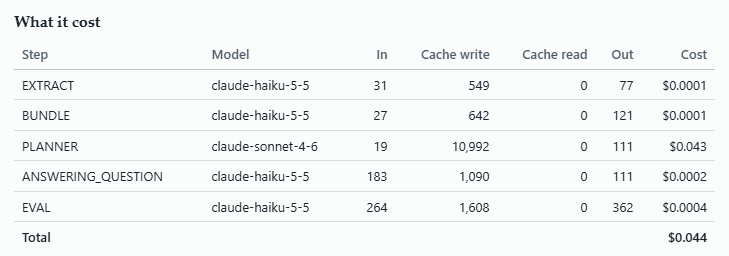
My application does a number of sophisticated techniques to minimise token cost – it’s the difference between profitable and not. Visibly, you can see I am utilising Haiku in preference to Sonnet where possible, and it saves a lot.
You might be wondering where the ingress/egress steps are – during testing, they are skipped, unless the test was designed to test them.
The observability layer has tracked cost for a while, this UI now exposes it with useful pivots. $4.73 was spent getting the baseline (includes running the some questions multiple times).
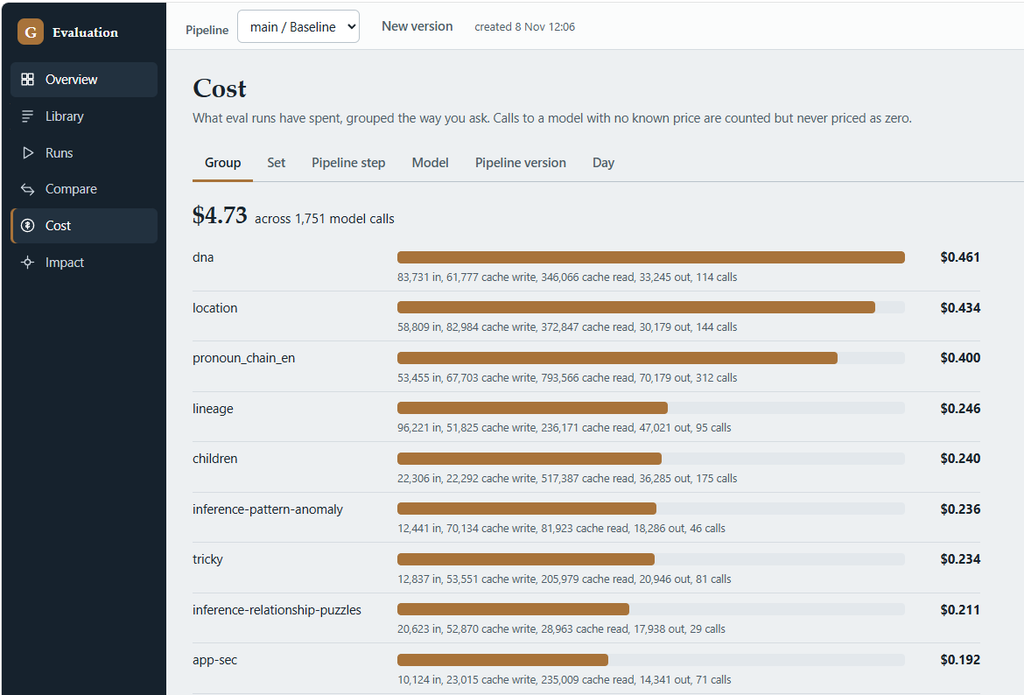
It’s event trackable by the group; some groups have more questions. It’s also useful to see which prompt is eating all the tokens. Unsurprisingly, it’s Sonnet – the planner – the most expensive model of the two. There are some “planner repair” calls too – that’s where a plan was created was either invalid, or the answer deemed poor. The disparity is quite evident – answering cost 10 cents, deciding how to get data – $4.
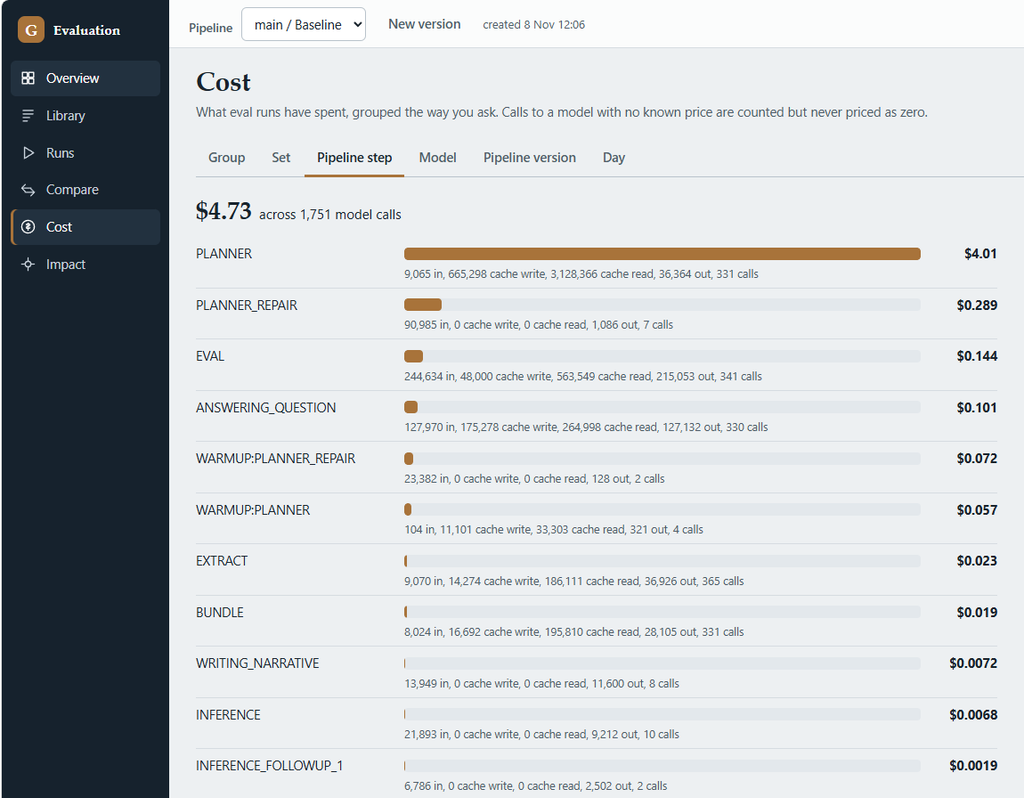
It also provides cut per model (2 entries), per pipeline, and per day.
“Impact” was a nice addition. What requires testing depends on what was changed, or phrased differently, it’s important that our re-test coverage is broad enough.
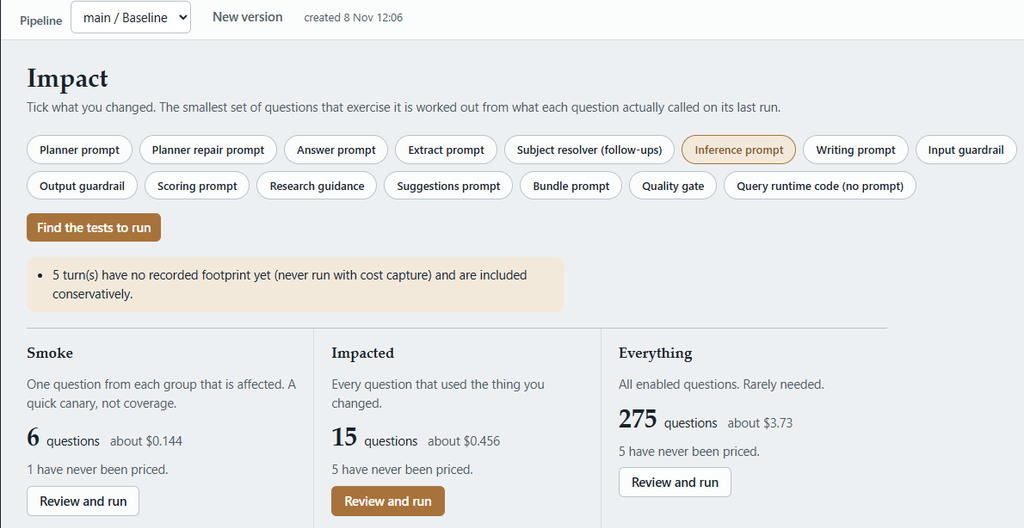
In this fictious example, a change to the “inference” prompt requires us to run at least 6 questions, or 15 if we want to be safe. Before doing so, we know how much it’s going to cost – in this instance 50 cents.
The “5 turns” highlights there are tests that don’t figure into the costs – these ones are “troll bypass” questions – ones that don’t hit an LLM, therefore 0 cost.
“Compare” isn’t covered in this post simply because it’s the same principle articulated in a prior post – you pick 2 version e.g. baseline and the one you last ran, and you can see how the answers improved or regressed. I also skip the “diagnose” because aside from the UI, it does the same thing.
Lastly UI wise, we have Trees, Import, Export.
- “Trees” allows us to point tests at different GEDCOM trees rather than one large trees. They are currently spread across 14+ trees; some contain adversarial content to prove the inbuilt protection works, and one is my own really large 73MB file (36,000 people).
- “Import” can be used if the database is empty, to populate all the questions / answers into the DB from a .json file that is tracked in Git.
- “Export” ensures I have a separate copy of questions and answers in a file.
I hope you like the design. If you’ve done something even more impressive, let everyone know in the comments.